Core and Grow are connected through an integration that syncs contact data between the two platforms. This is what allows a purchase in Core to trigger a workflow in Grow, or a member’s attendance history to appear on their Grow contact record.
How the sync works
The integration is primarily one-directional: Core to Grow. When something changes in Core (a new purchase, an attendance record, a membership status change), that data gets pushed into the matching contact record in Grow.
Grow does not push data back to Core in most cases. If you update a phone number in Grow, it will not automatically update in Core. The contact needs to be updated in both places, or the next Core sync will overwrite the Grow value.
Direction matters
Core is the source of truth for member data. If there’s a conflict between what Core says and what Grow says, Core wins on the next sync.
What syncs
The integration maps over 50 fields from Core into Grow. The table below shows each field, its name in Grow, and what it represents. Fields marked N/A map to standard built-in Grow contact fields. Everything else is a custom field created by the sync service.
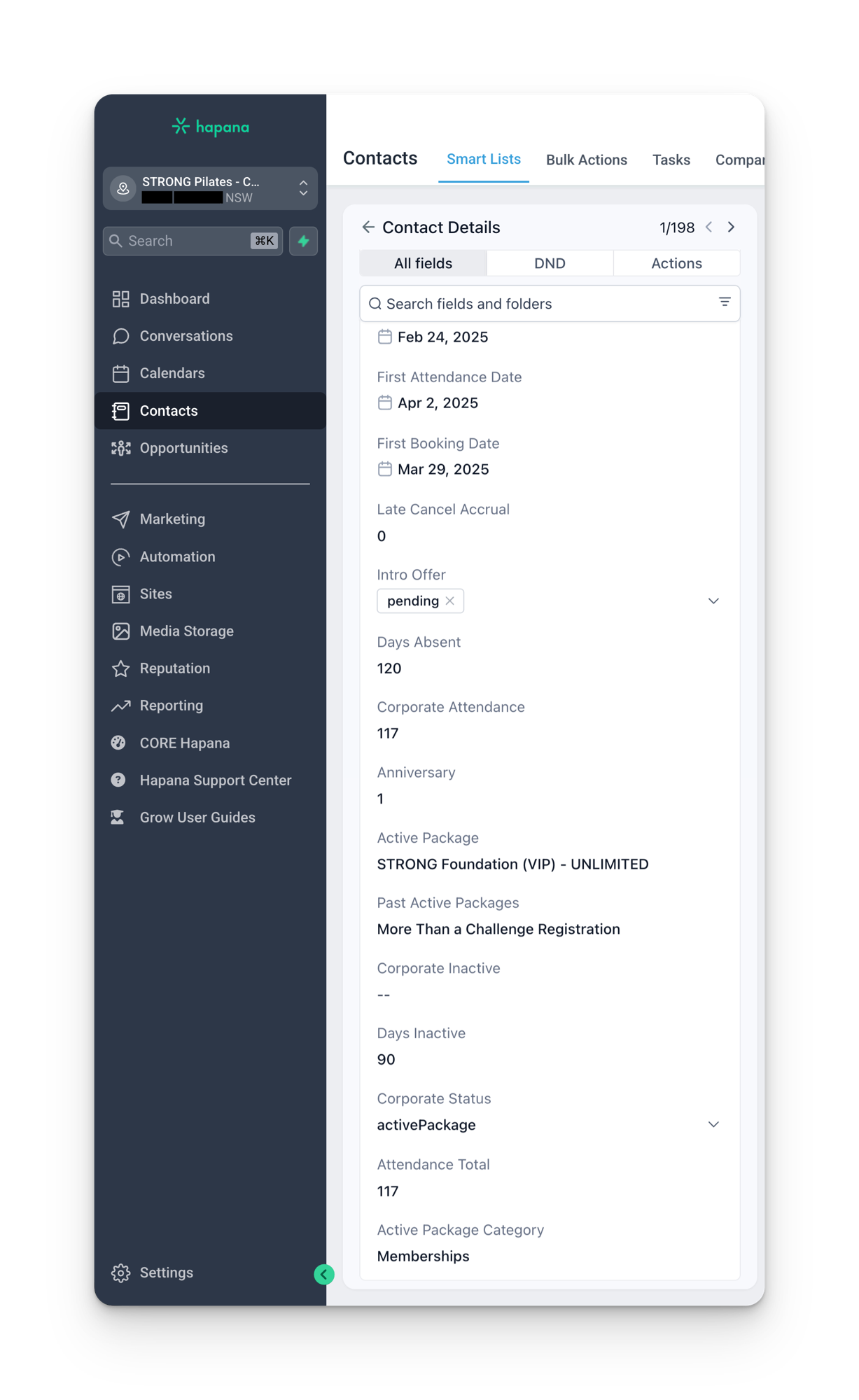
Contact basics
| Field | Grow field name | Notes |
|---|---|---|
| First Name | N/A (standard) | |
| Last Name | N/A (standard) | |
| N/A (standard) | Unique per location | |
| Phone | N/A (standard) | Only syncs validated numbers. Unique per location. |
| Date of Birth | N/A (standard) | |
| Street Address | N/A (standard) | May hold the full address depending on location |
| City / State / Country / Postal Code | N/A (standard) | |
| Contact Type | N/A (standard) | Always syncs as “customer” (overrides “lead” if set) |
DND preferences
| Field | Grow field name | Notes |
|---|---|---|
| DND Text Messages | N/A (standard) | Respects permanent DND settings in Grow |
| DND Emails | N/A (standard) | Respects permanent DND settings in Grow |
| DND All Channels | N/A (standard) | Set when both SMS and Email DND are marked |
| Email Opt In | contact.email_opt_in | Values: Opt In, Opt Out |
| SMS Opt In | contact.sms_opt_in | Values: Opt In, Opt Out |
Status and categorization
| Field | Grow field name | Notes |
|---|---|---|
| Core Status | contact.core_status | Values: Client, Alumni, Removed |
| Location Status | contact.location_status | Values: introOffer, suspendedMembership, activePackage, inactive, accountCreated |
| Corporate Status | contact.corporate_status | Same values as Location Status. Updated by HQ Flow (may be delayed). |
| Core Source | contact.core_source | How the contact originally found the brand |
Packages and membership
| Field | Grow field name | Notes |
|---|---|---|
| Active Package | contact.active_package | Currently active package(s) for the location |
| Active Package Category | contact.active_package_category | Category of the active package(s) |
| Past Active Packages | contact.past_active_packages | Every previously held package that is no longer active |
| Intro Offer | contact.intro_offer | Values: claimed, pending. Once claimed, never reverts. |
| Join Date | contact.join_date | Date the contact joined the location |
| Anniversary | contact.anniversary | Complete years since Join Date |
| Promo Codes Used | contact.promo_codes_used | Every coupon code ever used at the location |
| Home Location | contact.home_location | Location(s) where the contact has active packages. Can be multiple. |
Attendance and engagement
| Field | Grow field name | Notes |
|---|---|---|
| First Attendance Date | contact.first_attendance_date | First visit to the location |
| Attendance Total | contact.attendance_total | Total check-ins at the location |
| Corporate Attendance | contact.corporate_attendance | Check-ins across all locations. Updated by HQ Flow. |
| Days Absent | contact.days_absent | Days since last session. 0 if future booking exists. |
| Days Inactive | contact.days_inactive | Days since last credit use, or purchase, or Join Date. 0 if future booking. |
| Referrals | contact.referrals | Times referred by other clients at the same location |
Booking and first session
| Field | Grow field name | Notes |
|---|---|---|
| First Booking | contact.first_booking | Values: booked, pending. Once booked, never reverts. |
| First Booking Date | contact.first_booking_date | Date of first booking (regardless of whether it was attended or cancelled) |
| First Booking Status | contact.first_booking_status | Values: pending, booked, rebooked, attended, late cancel no show, cancelled |
| Late Cancel Accrual | contact.late_cancel | Late cancels since last attendance. Resets to 0 if future booking exists. |
| No Show Accrual | contact.no_show | No shows since last attendance |
| Late Cancel + No Show | contact.late_cancel_no_show | Sum of the two fields above |
Tags managed by the sync
The sync service also manages specific tags on contacts. Tags not managed by the sync service are left untouched.
classpassaccount createdmigrated
Manual edits get overwritten
Any information manually entered in Grow on the fields listed above will be overwritten by the sync on the next cycle. The only exception is tags that are not managed by the sync service.
Sync timing
The sync is not instant. There can be a delay between when something happens in Core and when it appears in Grow. This delay varies, but it’s usually within a few hours. During high-traffic periods (campaign launches, new studio openings), syncs can take longer.
Sync delays cause confusion
If a new member is not showing in the right pipeline, the first question to ask is whether the sync has caught up yet. Check the contact’s custom field values in Grow. If key fields (like intro offer purchase date) are empty, the sync hasn’t run yet.
Custom values in Grow
Many of the synced fields appear in Grow as custom values. These are dynamic placeholders that pull live data from the contact record. When a workflow sends an SMS that says “Hey {{contact.first_name}}”, it’s using a custom value that was populated by the Core sync.
We’ll cover the difference between custom fields and custom values in detail in the Custom Fields vs Custom Values section.
Common sync issues
- Phone numbers not syncing. Core validates phone formats differently. If the phone number doesn’t pass validation, it won’t sync.
- Missing intro offer dates. The sync only writes the
intro_offer_purchase_datefield. Other related fields (like first attendance date) may need manual checking. - Stale membership status. If a member cancels or suspends in Core, there can be a window where Grow still shows them as active.
- Duplicate contacts. If a contact exists in Grow before the Core sync creates them, you can end up with duplicates. The email address is the primary matching key.