Once a member has bought an intro offer and been set up by the New Intro Offers workflows, a second layer takes over: the day-by-day journey across the board, the visit count, and the three ways it can end. This page is the board, how to read it, and what to do when it looks wrong.
The board at a glance
The Intro Offer board has 25 columns. That sounds like a lot, but they fall into four simple groups, and most of them move on their own.
1 · Entry
2 · No-show (hasn't attended yet)
3 · Daily run (attending)
4 · Exits
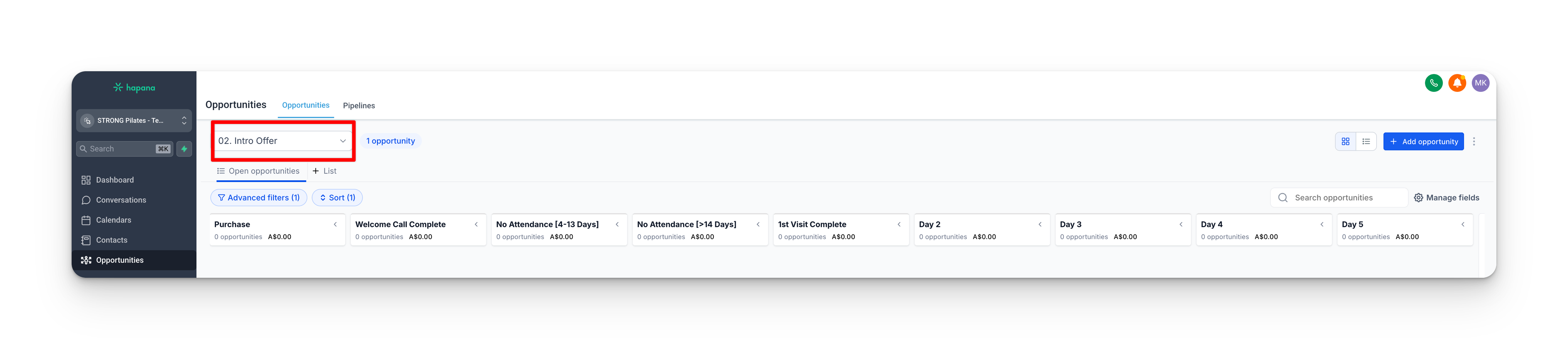
Most members go Purchase, then 1st Visit Complete, then the daily run. A member who has not attended yet waits in the No Attendance columns and joins the daily run the moment they come in. The columns sit on the board in this same order, left to right, so 1st Visit Complete is the start of the daily run, not an entry column.
| Group | Columns | Who moves the card |
|---|---|---|
| Entry | Purchase, Welcome Call Complete | Automatic, except Welcome Call Complete |
| No-show | No Attendance [4-13 Days], No Attendance [over 14 Days] | Automatic |
| Daily run | 1st Visit Complete (day 1), Day 2 through Day 15 | Automatic |
| Exits | Expired, Expired Call No Answer 1/2/3, Future Follow Up, Membership/Package | Automatic, except the Call No Answer and Future Follow Up columns |
The member's journey across the board
A member's path through the board is simple once you see it:
Bought, not yet attended
Status: Pre (Purchase column)
Attends first class
Status: Active (1st Visit Complete)
One column per day
Day 2 to Day 15
Membership / Package
joins as a member
Expired
offer runs out
- A new buyer sits in Purchase with the status Pre.
- The moment they attend their first class, they flip to Active and the card moves to 1st Visit Complete. There is no “Day 1” column. 1st Visit Complete is day one.
- From there the card moves one column per day: Day 2, Day 3, and so on to Day 15.
- It ends one of three ways: they join (Membership/Package), the offer runs out (Expired), or your team parks them for later.
What moves itself, and what you move
This is the part studios get wrong most often, so it is worth being precise.
Automatic. Each daily move has its own workflow that fires the moment a card lands in a column. It waits about a day, checks whether the member has joined or let the offer lapse, then pushes the card to the next column. You do not touch these. The day-by-day march from 1st Visit Complete down to Day 15 runs itself.
You move these by hand. Four columns track something the system simply cannot see, so a human has to move the card:
| Column you move | When you move it |
|---|---|
| Welcome Call Complete | After you have actually completed the welcome call. Grow has no way to know the call happened. |
| Expired Call No Answer 1, 2, 3 | As you work through your expired-member call attempts and nobody picks up. Each no-answer is a manual step. |
| Future Follow Up | When you decide to park a member to follow up later. That is a judgement call, so it is a manual move. |
The rule of thumb
If the card depends on a human action (a call made, a call answered, a decision to wait), you move it. Everything else moves itself.
Where the visit number on the card comes from
Every card shows the member's name and a visit count, like “Sarah (3 visits) - STRONG Intro Offer.” Here is exactly where that number comes from, because it is the source of the most common confusion.
Member attends a class
Core updates Attendance Total
02. Intro Offer Visits Update adds +1
to Intro Offer Pipeline Visits
The field updates instantly
Intro Offer Pipeline Visits
Card name shows (N visits)
re-printed on the next daily move
The workflow that drives this is 02. Intro Offer Visits Update. Every time the member's attendance changes, it adds 1 to their Intro Offer Pipeline Visits count.
But notice the gap between the last two steps. The field updates the instant a class is attended. The card name only re-prints that number when a workflow next re-writes the card, which after the first visit happens on the next daily move. So the field is always current, and the card name catches up roughly once a day.
Core vs Grow: read this before you trust a number
Two numbers look similar and get mixed up constantly. They come from different places.
| Number | Where it comes from | What it means |
|---|---|---|
| Attendance Total | Core (Hapana) | The real count of classes attended. This is the source of truth. |
| Intro Offer Pipeline Visits | Grow, not Core | A tally that Grow adds 1 to every time Attendance Total changes. A count kept by counting, not the real number. |
Because Pipeline Visits is counted by Grow rather than read from Core, it can drift. The workflow adds 1 whenever Attendance Total changes, not only when it goes up. So if Core re-syncs and nudges the value, Grow can add an extra visit. When the two disagree, Attendance Total from Core is the one to believe.
When a card looks wrong: the Pipeline Fix
There is a repair workflow built for exactly this: 202510 Intro Offer Pipeline Fix. It recalculates which column a member should be in from their real Intro Offer Purchase Date and Intro Offer First Visit Date, then puts the card where it belongs.
To run it on a member whose card has gone wrong, add the tag intro offer fix to their contact. The workflow does the rest. (It only works when those two dates are correct. If the dates themselves are wrong, fix them first, then run it.)
When a member's intro offer gets extended
Sometimes a studio extends a member's intro in Core to give them more time. Core does not tell Grow, and the Grow automation is built around the member's original purchase and first-visit dates plus a fixed 14-day tag timer. So an extension has to be handled by hand, or the member gets wrongly expired.
Two things go wrong if it is left alone
1. The card runs out the original timeline and lands in Expired.
2. Even if you move the card back, the 06 workflow still removes the protection tag on the old 14-day timer, so Status Update expires them again.
What to do when an intro gets extended. Three steps, all manual:
- Move the card to the right day. Work out how many days are left on the extended offer, and move the card to the Day column that lines up with that, so the daily run carries them to Day 15 right as the extended offer actually ends.
- Take them out of the tag workflow. Remove the contact from the 06. STRONG Intro Offer workflow (the one that adds, and later removes, the
active - 5 session strong intro offertag). This stops the tag being removed early on the original 14-day timer, which is what would otherwise re-expire them. - Set a task to remove the tag yourself. Create a task dated to the new, extended expiry. On that day, remove the
active - 5 session strong intro offertag by hand. That is what tells the pipeline they have genuinely reached the end, and lets the normal expiry run.
Why all three
Step 1 keeps the board accurate. Step 2 stops the automation expiring them early. Step 3 makes sure they still expire at the right time once the extension is genuinely over. Skip step 2 and the tag removal re-expires them. Skip step 3 and they never expire at all.
FAQ
Questions about how the pipeline is meant to work.
How long does it take for a purchase in Core to show up in Grow?
Usually 15 to 30 minutes. The Core-to-Grow sync is not instant, so when a member buys you will not see them on the board straight away. If Core has not validated the member's phone number yet, it can take a little longer, but it should never be more than an hour. If it has been over an hour, treat it as a fault and see Troubleshooting below.
Why is the visit number in the member's profile different from the number on their card?
They are two separate stores. The profile field (Intro Offer Pipeline Visits) updates the moment a class is attended. The card name is a text label that only re-prints the number when a workflow re-writes the card, which after the first visit happens about once a day. Attend a class this morning and the field jumps straight away, but the card still shows the earlier number until that day's move runs. (The card carries only one true field of its own, Last Call Date. Everything else you see on it, the visits and the offer name, is baked into the card's name when it was last written.)
Why are there two visit fields, Intro Offer Pipeline Visits and STRONG Intro Offer Visits?
Both count the same thing and move together. The card name uses Intro Offer Pipeline Visits.
A member has used up all their classes, or their package shows empty, but they are still active in the pipeline. Why?
Because the 5-session offer uses a credit when a class is booked, not when it is attended. A member who books all five classes ahead empties their package straight away, even before attending. The active - 5 session strong intro offer tag (added on purchase by the 06. STRONG Intro Offer workflow) keeps them protected in the pipeline until 14 days from their first visit or 5 completed classes, so they are not expired early just for booking ahead.
A card is sitting in a column and nothing is moving it. Is it stuck?
Probably not. Check whether it is one of the four hand-moved columns: Welcome Call Complete, the three Expired Call No Answer columns, or Future Follow Up. Those never move on their own. They are waiting for you.
Troubleshooting
When something looks wrong, start here. Each one is a real cause we have seen, written out in full so you can fix it from this page.
A member purchased, but they are not showing in Grow at all
What's happening. Two common causes, in order of likelihood:
- The sync has not run yet.Core to Grow takes 15 to 30 minutes, and up to an hour if the member's phone number is not validated in Core. Most “missing” members are just early.
- The package was set up in Core with the wrong Package Category. A member only enters the Intro Offer pipeline when their Active Package Category reads Intro Offer or Intro Offers. If the package was created under a different category by mistake, the sync still brings the contact across, but the Status Update workflow never adds them to the board. This has happened in the US by accident.
How to fix.If it has been under an hour, wait. If it has been longer, open the member in Core and check the package's Category. Correct it to Intro Offer (or Intro Offers), and the next sync will place them on the board.
A member is on the board, but they never got the welcome email or any nurture
What's happening. The board and the messages run off two different fields, the same split from the New Intro Offers page. A card lands on the board whenever the Active Package Category is Intro Offer or Intro Offers, whatever the package is called. But the post-purchase automations (the welcome email, the nurture sequence, the check-in SMS, and the upsells) only fire when the Active Package namematches what those workflows look for, such as “STRONG Intro Offer” or “7 Classes for”. So a studio running an intro offer under its own custom name will see those members appear on the board correctly, but get none of the messaging.
Watch out. The protection tag keys off the package name too, so a custom-named offer also misses it. That means the booking-ahead safeguard does not apply, and the member can be expired early once they book all their classes.
How to fix. The automations have to be custom-built for that package name: the welcome, nurture, milestone, and tag workflows cloned and pointed at the new name. That is an HQ build, so flag it to HQ with the studio and the exact package name. The simpler option, if the studio is willing, is to use one of the standard intro offer names in Core so the existing automations match. Until either is done, the studio handles the welcome and follow-up for those members by hand.
The day counter started on the wrong day, or a free class already moved them to 1st Visit Complete
What's happening.Grow cannot tell a free class apart from a paid intro class. Any attended class moves the member's Attendance Total, which fires the Visits Update workflow, flips them from Pre to Active, and anchors the day counter to that class's date. So a member who did a free STRONG Starter class, or an old casual drop-in from months ago, can be moved to 1st Visit Complete with the counter on the wrong date, before they have used a single intro credit.
How to check.In Core, open the member's profile.
- Payments tab (the 4th icon): find the intro offer package, note its Begin Date, and open Visits History to see every booked class.
- Schedule tab (the 3rd icon): open Past Sessions and filter the dates to see every attended class, including free ones.
- If a class shows in Past Sessions but not in the package's Visits History, it was a free class. If its date is before the package Begin Date, it started the counter early.
How to fix. Move the card back to where the member actually is: back to Purchase if they have not started their paid offer, or the correct Day column if they have. Set Intro Offer Pipeline Visits to the real number, and correct the Intro Offer First Visit Date field to their actual first paid visit. Once those dates are right, you can add the intro offer fix tag to let the Pipeline Fix re-place the card from the corrected dates. There is no permanent prevention: the Core-to-Grow sync does not say whether a class was free or paid, so this has to be caught by hand.
Pipeline Visits is higher than the classes the member actually attended
What's happening. Pipeline Visits is a Grow tally, not a copy of Core. The Visits Update workflow adds 1 every time Attendance Total changes, not only when it goes up. Core syncs many times a day and can push a value that bounces (for example 1, then 2, then 1, then 2), and each change adds another visit, so the count inflates past the real attendance.
Why it matters. When Pipeline Visits reaches 5, the protection tag active - 5 session strong intro offer is removed. If the count is inflated, the tag comes off before the member has truly done 5 classes, and with the tag gone the Status Update workflow sees the empty package and moves them to Expired with sessions still left.
How to check.Compare Grow's Pipeline Visits (in the Intro Offer Information section on the contact) against the real attendance count in Core's Visits History. To confirm the cause, open Grow Settings, then Audit Logs, search the contact, and look at Attendance Total across the Integration syncs. Fluctuating values with Pipeline Visits ticking up each time is the inflation.
How to fix. Correct the Pipeline Visits field to the real attendance count. If the protection tag was already removed, re-add active - 5 session strong intro offerand move the card back to the correct day. If you see this across several members at one location, the studio's Core sync may be misconfigured, so flag it to HQ with the contact IDs and audit-log screenshots.
A member who never attended is suddenly running the full nurture sequence
What's happening. This is almost always a duplicate-contact fix gone wrong. The Merge button is not available at studio level, so consolidating two records for one person means editing identifier fields (moving a phone number, adding a name) by hand. If you do that on a record that already carries attendance history, the field change can fire the Visits Update workflow, which sees status Pre with attendance above 0 and flips them to Active with 1 visit. That cascades into 1st Visit Complete and the whole 15-day nurture, even though they have zero bookings on their current offer.
How to check. In Grow Audit Logs, search the contact around when it went wrong and look for identifier-field edits, followed within seconds by a cascade of status change, visit update, tag, and card-move entries. Confirm in Core that they have zero bookings on the current package.
How to fix. Reset the pipeline position by hand: move the card back to Purchase, set Pipeline Visits to 0, set Intro Offer Pipeline Status to Pre, and remove any tags the false activation added. Going forward, never consolidate duplicate contacts while a record has an active intro offer. The full duplicate-contact workaround, and the rule to leave active intro offers alone, is on the Contact Duplicates page.
A member bought, but they are still getting lead nurture and never showed as Sold in the Leads Pipeline
What's happening. This is two contacts for one person. If they opted in with one email and purchased with a different email, Core creates a second contact for the purchase. Grow now holds two records with the same name and different email addresses: the opt-in record stays in the Leads Pipeline being nurtured, while the purchase record runs the Intro Offer pipeline on its own.
How to fix. The Merge button is not available at studio level, so you consolidate the two records by hand: move the shared phone number onto the record you are keeping and match it in Core so the sync does not undo it. The full step-by-step is on the Contact Duplicates page. One hard rule: if either record has an active intro offer, leave the identifier fields alone until the offer period is over, because editing them is exactly what triggers the false activation in the entry above.
Reference: which workflow moves a card into each column
This is the precise map for tracing what put a member where they are. You do not need it day to day. (Verified from the live template workflows. Every workflow here is a draft on the template and runs live once the studio is switched on, except the Pipeline Fix, which is always on.)
| Column | What moves a card into it |
|---|---|
| Purchase | 01. Status Update and 01. Purchase Confirmation, on the Core purchase |
| 1st Visit Complete | 02. Visits Update, on the first attended class (or Status Update / Purchase Confirmation if they had already attended) |
| Day 2 | Day 01 > Day 2 |
| Day 3 | Day 02 > Day 3 |
| Day 4 through Day 14 | the matching workflow: Day 03 > Day 4 writes Day 4, on up to Day 13 > Day 14 writes Day 14 |
| Day 15 | Day 14 > Day 15 |
| No Attendance [4-13 Days] and [over 14 Days] | 03. False Starter Check |
| Expired | whichever step detects the offer has ended: 01. Status Update, or the active Day workflow's expiry branch |
| Membership/Package | whichever step detects they converted: 01. Status Update, 05. Mark as Sold, or 07. Marked Won |
| Welcome Call Complete | nobody. You move it by hand. |
| Expired Call No Answer 1, 2, 3 | nobody. You move it by hand. |
| Future Follow Up | nobody. You move it by hand. |
Two things to read alongside the table
Each “Day A > Day B” workflow is named for exactly what it does.It is triggered when the card arrives in column A, waits about a day, then writes the card into column B. So “Day 01 > Day 2” fires when the card reaches its day-one spot (1st Visit Complete) and moves it into Day 2. That is how the run advances itself, one column a day.
The 202510 Pipeline Fix can write a card into almost any column. It is the reconciler. When you add the intro offer fix tag, it recomputes the right column from the real dates and places the card there.
What starts each of these workflows
| What changes or happens | Workflow it starts |
|---|---|
| Active Package Category changes | 01. Intro Offer Status Update |
| Active Package changes | 01. Purchase Confirmation, and 06. the protection-tag workflow |
| Attendance Total changes | 02. Intro Offer Visits Update |
| A card arrives in a Day column | the next Day workflow |
intro offer fix tag added | 202510 Pipeline Fix |
active - 5 session strong intro offer tag removed | 01. Status Update (re-checks, and can expire them) |