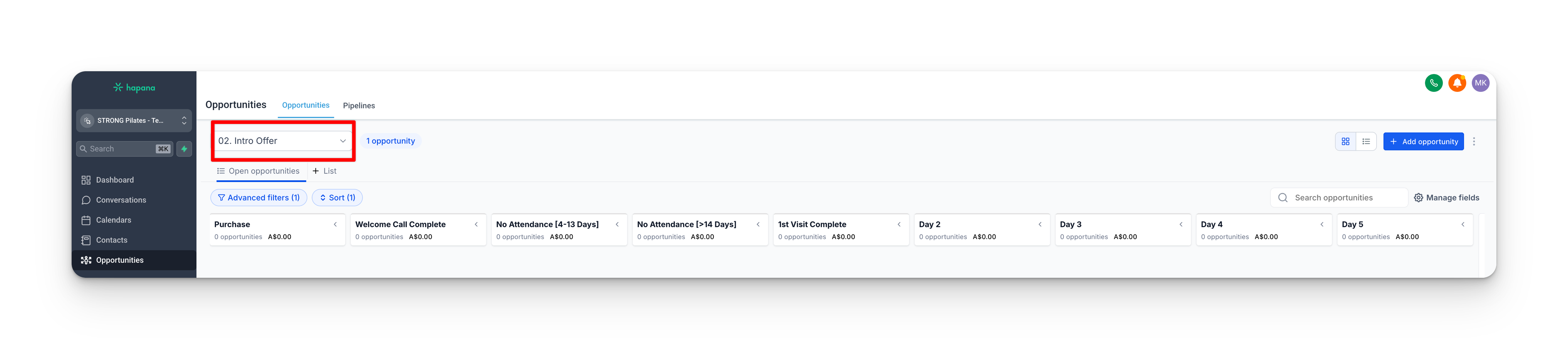
You have never opened Grow before. By the end of this page and the next, you will understand the Intro Offer pipeline the way you understand a whiteboard: what each column means, which cards move on their own, which cards you move by hand, and why the numbers sometimes look off.
The pipeline ships switched off
On a brand-new studio the Intro Offer pipeline sits dormant until opening day, when it is switched on as part of your studio's setup. If you are reading this before you open, the automation described here is not running yet. That is by design.
What the Intro Offer pipeline is
The Intro Offer pipeline is the board in Grow that tracks every member on the 5-session intro offer, from the moment they buy to the moment they either join as a member or let the offer lapse.
It is a visual dashboard and an automation engine at the same time. You read it like a board. Behind the scenes, a set of workflows moves most of the cards for you.
How a member lands on the board
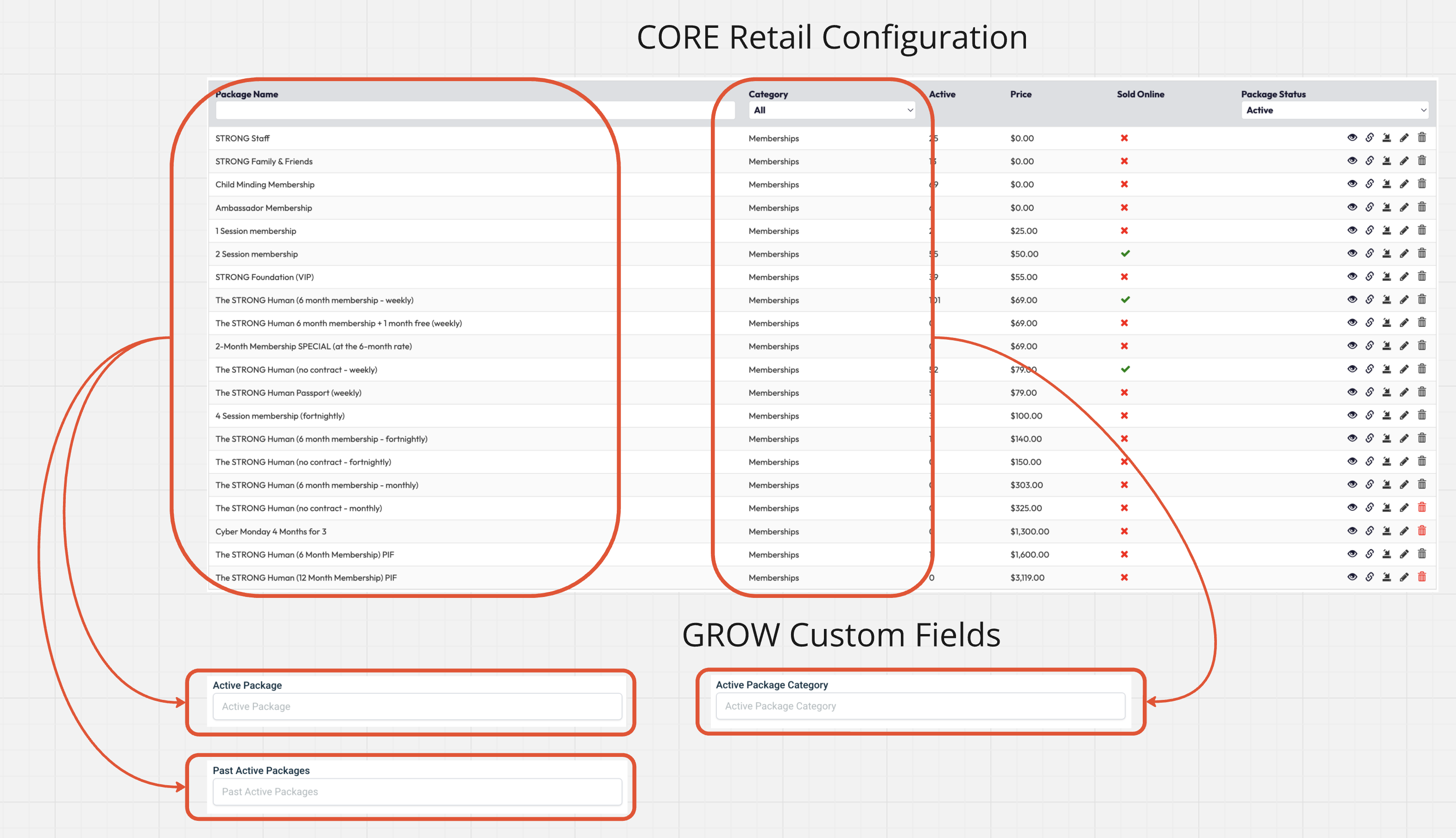
Nobody adds a member to the board by hand. A purchase in Core does it, by updating two fields that then do two different jobs. Getting these two fields straight is the most important thing on this page.
Active Package
the exact offer name
Drives the messages. Purchase Confirmation sends the welcome email and the offer-specific comms.
Active Package Category
the bucket: Intro Offer
Drives the board. Status Update adds the card and handles every move.
Here is the chain in plain words:
- The member buys the intro offer in Core.
- The Core-to-Grow sync updates two fields on their contact: Active Package (the exact offer they bought, such as "STRONG Intro Offer") and Active Package Category (the bucket it sits in, "Intro Offer").
- Those two fields drive two different things, and this is the part to remember:
- Active Package drives the communications. The 01. STRONG Intro Offer Purchase Confirmation workflow watches this field and sends the welcome email and the messages specific to that offer.
- Active Package Category drives the pipeline. The 01. Intro Offer Status Update workflow watches this field, uses it to add the card to the board, and later uses it again to move the member to Expired (when the category empties) or to Membership/Package (when the category changes to one of those).
- The result on a fresh purchase: a first card in the Purchase column, status Pre (bought, not yet attended), visit count 0, tagged into the pipeline.
If the member has somehow already attended a class by the time this runs, they skip straight to the 1st Visit Complete column instead.
The two fields to keep straight
Active Package is the exact offer name, and it decides what messages go out. Active Package Category is the bucket, and it decides where the card goes on the board. Every pipeline move (added in, sent to Expired, sent to Memberships or Packages) keys off the Category, never the package name.
A Core quirk: a package can empty before a member attends
This one trips studios up, so it is worth understanding properly.
The 5-session intro offer is credit-based, and Core uses up a credit the moment a class is booked, not when it is attended. So a member who books all five classes up front uses all five credits straight away. Core then syncs their Active Package and Active Package Category to empty, even though they have not set foot in the studio yet.
Left alone, that empty Category would tell the Status Update workflow to move them to Expired far too early. That is exactly why the 06. STRONG Intro Offer workflow exists.
The protection tag
On purchase, workflow 06 adds the tag active - 5 session strong intro offer. While that tag is on the contact, the empty Category cannot expire them. The tag is only removed once 14 days have passed from their first visit or they have completed 5 classes, whichever comes first. So a member who books ahead stays protected for the full intro window instead of being expired the day they finish booking.
The welcome beat
As the card is created, the member gets the human touch:
- An email, "You're in. Let's Get STRONG.", confirming the purchase and pointing them to booking.
- A task lands for your team, the Welcome Call, prompting someone to call and help them book their first class.
That welcome call is the first thing on the board that you drive. More on that on the next page.
Then the journey begins
Once the card exists and the welcome sequence has sent, the member starts moving through the board one step at a time. That day-by-day journey, and the columns you move by hand, is the During Intro Offer page.